주니어 엔지니어를 대상으로 클린 아키텍처의 개념과 장단점, 레이어 구성과 의존 방향을 Unity 문맥에서 설명합니다. 간단한 퀴즈 앱을 예로 Domain/Application/Presentation/Infrastructure 구현과 DI 설정, 다중 도메인 간 결합 문제와 Pub/Sub 기반 해결책까지 다룹니다.
② 복잡한 분기에 State, 요구와 실행의 분리에 Command
④ 클린 아키텍처 입문 ← 지금 여기
소프트웨어 개발에서 아키텍처라는 단어는 두 가지 방식으로 쓰입니다.
본 글이 다루는 것은 2번, 개념적 아키텍처입니다.
디자인 패턴이 재사용 가능한 작은 설계 정형을 제시하는 반면,
개념적 아키텍처는 지켜야 할 원리 원칙을 가리키는 큰 틀의 가이드라인입니다.
따라서 실제상과 세부는 프로젝트의 문맥에 맞춰 만들어지는 것이라 생각해 주시면 됩니다.
또한 여러 아키텍처를 조합해 개발하는 경우도 있습니다.
이번에는 Unity에서의 앱 장기 개발을 가정하고 클린 아키텍처를 다룹니다.
그 밖에도 다양한 아키텍처가 있으니 문맥에 맞춰 사용하는 것이 이상적입니다.
코어(= 핵심 규칙)를 지키는 사고를 최우선으로 한다.
코어를 여러 층(= 기능적 묶음)으로 감싼다.
층의 순서는 도메인과의 관계나 변경 빈도로 결정되고, 의존은 항상 바깥에서 안쪽으로의 단방향으로만 흐른다.
장기간 진화시킬 전제를 둔 소프트를 최소 코어와 플러그인으로 구축하고,
코어를 안정시키면서 외부 기능을 핫스왑할 수 있게 한다.
etc...
클린 아키텍처의 개요는 앞서 예시에서 언급했습니다.
아래는 장점과 단점입니다.
먼저 구현에 필요한 지식을 설명합니다.
각 레이어를 설명하되, 학교의 조별 과제에 비유해 설명하겠습니다.
한 조 안에서의 이야기입니다.
| 레이어 | 구현 예 | 비유 | 보충 |
|---|---|---|---|
| Presentation | · 버튼 눌림 감지 · Text나 Image 갱신 | 발표 담당 | · 담당자는 누구라도 OK · 바꿔도 다른 데 영향 없음 |
| Application | · 스코어 취득 → 계산 → 저장까지의 절차 담당 | 진행 담당 | · 발표까지의 진행 변경 · 새로운 작업 추가 |
| Domain | 스코어 상한 등 앱의 핵심 | 주제·평가기준·제출 형식 등의 규칙 | · 일관되게 지켜야 함 · 여기서 흔들리는 건 가급적 NG |
| Infrastructure | PlayerPrefs/Https 등 외부 I/O와 모델 변환 | 도서관·PC/프린터 | · 내외부 리소스를 의미 · 어떻게 대체해도 OK |
각 레이어는 비유와 가까운 역할을 담당합니다.
구현 시에는 소속된 레이어를 염두에 두고
“여기서 구현해야 하는가, 다른 레이어에서 구현해야 하는가”를 생각하며 진행해야 합니다.
또한 핵심인 도메인을 지키기 위해
의존은 바깥에서 안으로의 단방향(Infrastructure, Presentation → Application → Domain 등)
이어야 합니다.
이 관계를 도식화하면 유명한 이미지와 같이 됩니다.
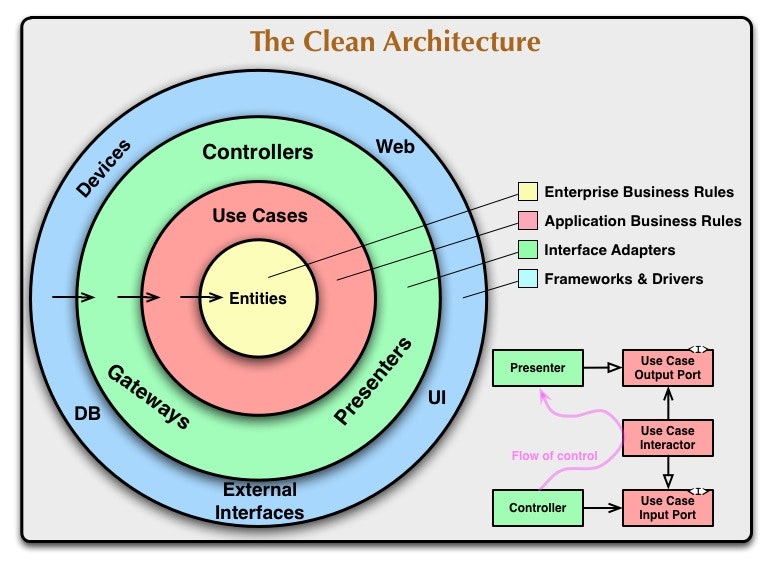
덧붙여, 본 글에서는 Unity에서의 구현을 떠올리기 쉽다는 이유로,
클린 아키텍처의 구체화 중 하나인 어니언 아키텍처의 명칭과 가까운
“Domain/Application/Presentation/Infrastructure”를 채택합니다.
Clean Architecture 원전의 그림과 대응시키면, Domain=Entities, Application=Use Cases, Presentation=Interface Adapters, Infrastructure=Frameworks & Drivers가 됩니다.
클린 아키텍처와 어니언 아키텍처의 관계에 대한 자세한 내용은 아래를 참고하세요.
https://zenn.dev/streamwest1629/articles/no-clean_like-clean_its-onion-solid
클래스 A의 코드 안에서 클래스 B의 이름을 쓰고 있다면, A→B 방향으로 의존하고 있습니다.
이때 B를 수정하면 A가 영향을 받을 가능성이 높아집니다.
Domain → Infrastructure 방향으로 의존해 버린 나쁜 예를 들어 보겠습니다.
먼저 도메인입니다.
public class Score
{
    const string Key = "Score";

    public int Add(int gain)
    {
        // Infrastructure에 의존
        var v = PlayerPrefs.GetInt(Key, 0);
        v += gain;

        // Infrastructure에 의존
        PlayerPrefs.SetInt(Key, v);

        return v;
    }
}
이때 저장소를 PlayerPrefs에서 서버로 변경하게 되었다고 해 봅시다.
도메인은 본질만을 다른 것과 분리해 구현되어야 함에도 불구하고, 대폭 변경이 필요해집니다.
도메인에 의존하는 클래스의 처리에도 영향이 생깁니다.
public class ScoreCounter
{
    readonly HttpClient _http = new();
    const string Url = "https://api.example.com/score";

    public async Task<int> AddAsync(int gain)
    {
        var v = int.Parse(await _http.GetStringAsync(Url));
        v += gain;
        await _http.PutAsync(Url, new StringContent(v.ToString()));
        return v;
    }
}
따라서 의존은 이 경우 Infrastructure → Domain 방향이어야 합니다.
또한 애플리케이션 레이어는 도메인과 관계를 맺는 제어 역할의 레이어입니다.
이 레이어는 도메인 다음으로 불변이어야 합니다.
이처럼 연쇄적으로 레이어를 생각해 보면, 의존이 바깥에서 안으로의 단방향이어야 함을 이해할 수 있습니다.
심플한 퀴즈 앱을 구현합니다.
정답 버튼을 누르면 10점이 가산되고, 값은 로컬에 저장됩니다.
사실 클린 아키텍처를 도입하기에는 너무 단순한 앱입니다.
다만 여기서 설명하고 싶은 것은 나중에 서버 동기화 등을 추가하더라도
도메인의 클래스는 한 줄도 건드릴 필요가 없다는 점입니다.
조별 과제의 비유: 주제·평가기준·제출 형식 등의 규칙
변경되어서는 안 되는 중요 사항만 작성합니다.
public class Score
{
    public int Value { get; }

    public Score(int rawValue)
    {
        Value = Math.Clamp(rawValue, 0, 10_000);
    }

    public Score Add(int inc)
    {
        return new Score(Value + inc);
    }
}
덧붙여, 이 층에서 인터페이스를 작성합니다.
목적은 의존을 안쪽으로의 단방향으로 만들고, 확장성을 위해 다른 레이어와 느슨하게 결합시키는 것입니다.
나중에 Infrastructure 층에서 사용하게 됩니다.
// 영속화 리포지토리
public interface IScoreRepository
{
    UniTask<int> LoadAsync();
    UniTask SaveAsync(int score);
}
조별 과제의 비유: 진행 담당
Domain을 사용해 사용자의 목적을 달성하는 절차를 정의합니다.
// DTO
public struct AddScoreRequest  { public int Gain; }
public struct AddScoreUpdated { public int Total; }

// 구체
public class AddScoreInteractor : IStartable, IDisposable
{
    private IScoreRepository repository;
    private IPublisher<AddScoreUpdated> publisher;
    private ISubscriber<AddScoreRequest> addScoreRequested;
    private IDisposable subscription;

    private Score current;

    public AddScoreInteractor(
        IScoreRepository repository,
        IPublisher<AddScoreUpdated> publisher,
        ISubscriber<AddScoreRequest> addScoreRequested
    )
    {
        this.repository = repository;
        this.publisher = publisher;
        this.addScoreRequested = addScoreRequested;
    }

    public void Start()
    {
        InitializeAsync().Forget();
        subscription = addScoreRequested.Subscribe(req => HandleAsync(req).Forget());
    }

    public void Dispose() => subscription?.Dispose();

    async UniTask InitializeAsync()
    {
        int raw = await repository.LoadAsync();
        current = new Score(raw);

        publisher.Publish(new AddScoreUpdated { Total = current.Value });
    }

    async UniTask HandleAsync(AddScoreRequest req)
    {
        current = current.Add(req.Gain);

        await repository.SaveAsync(current.Value);

        publisher.Publish(new AddScoreUpdated { Total = current.Value });
    }
}
다만 설명을 위해 생략했지만, 여기서 Score를 new 하지 않고
Factory 같은 클래스를 두는 것도 좋을 수 있습니다.
조별 과제의 비유: 발표 담당
UI 등 보이는 부분은 변경 빈도가 높아 Application 레이어보다 바깥에 위치합니다.
// Presenter
public class AddScorePresenter : IStartable, IDisposable
{
    private ScoreView view;
    private IPublisher<AddScoreRequest> publisher;
    private ISubscriber<AddScoreUpdated> scoreUpdated;
    private IDisposable subscription;

    public AddScorePresenter(
        ScoreView view,
        IPublisher<AddScoreRequest> publisher,
        ISubscriber<AddScoreUpdated> scoreUpdated
    )
    {
        this.view = view;
        this.publisher = publisher;
        this.scoreUpdated = scoreUpdated;
    }

    public void Start()
    {
        // 버튼 클릭 → 요청 발행
        view.CorrectAnswerClicked += OnCorrectAnswer;

        // 스코어 갱신 통지를 구독
        subscription = scoreUpdated.Subscribe(res => Present(res));
    }

    public void Dispose()
    {
        view.CorrectAnswerClicked -= OnCorrectAnswer;
        subscription?.Dispose();
    }

    private void OnCorrectAnswer()
    {
        publisher.Publish(new AddScoreRequest { Gain = 10 });
    }

    public void Present(AddScoreUpdated res)
    {
        view.Render(res.Total);
    }
}

// View
public class ScoreView : MonoBehaviour
{
    [SerializeField] private TMP_Text scoreText;

    public event Action CorrectAnswerClicked;

    public void OnCorrectAnswerButton() => CorrectAnswerClicked?.Invoke();

    public void Render(int total) => scoreText.text = $"{total} Point";
}
조별 과제의 비유: 도서관·PC/프린터
PlayerPrefs로 구현하고 있지만, 서버 저장이 될 수도 있습니다.
변화하기 쉬운 레이어라는 전제로 구현합시다.
public class PlayerPrefsScoreRepository : IScoreRepository
{
    private const string Key = "Score";

    public UniTask<int> LoadAsync()
    {
        return UniTask.FromResult(PlayerPrefs.GetInt(Key, 0));
    }

    public UniTask SaveAsync(int score)
    {
        PlayerPrefs.SetInt(Key, score);
        PlayerPrefs.Save();
        return UniTask.CompletedTask;
    }
}
마지막으로 이전 글에서 언급한 VContainer를 사용해 의존성 주입을 수행합니다.
public class QuizLifetimeScope : LifetimeScope
{
    [SerializeField]
    private ScoreView scoreView;

    protected override void Configure(IContainerBuilder builder)
    {
        // MessagePipe
        var options = builder.RegisterMessagePipe();
        builder.RegisterMessageBroker<AddScoreRequest>(options);
        builder.RegisterMessageBroker<AddScoreUpdated>(options);

        // Infrastructure
        builder.Register<IScoreRepository, PlayerPrefsScoreRepository>(Lifetime.Singleton);

        // Presentation
        builder.RegisterComponent<ScoreView>(scoreView);
        builder.RegisterEntryPoint<AddScorePresenter>(Lifetime.Scoped);

        // Application
        builder.Register<AddScoreInteractor>(Lifetime.Singleton).As<IStartable>();
    }
}
이와 같이 핵심을 지키고, 층으로 감싸며,
의존을 안쪽으로의 단방향으로 만드는 클린 아키텍처를 구현할 수 있습니다.
예시에서는 도메인 하나만 다뤘습니다.
실제 개발에서는 복수의 도메인을 다루는 것이 일반적입니다.
이 여러 도메인을 어떻게 다룰지는 상황에 따라 다르지만,
다음과 같은 문제가 발생할 가능성이 있습니다.
도메인이 여러 개라는 것은
애플리케이션 레이어의 구현도 여러 개 존재한다는 뜻입니다.
이 예에서는 서로를 new 해 버린 경우를 다룹니다.
// 애플리케이션 레이어 A  스코어 가산
public class ScoreInteractor
{
    private readonly AchievementInteractor achievement;

    // 다른 도메인의 애플리케이션 레이어 클래스를 참조
    public ScoreInteractor(AchievementInteractor ach) => achievement = ach;

    public void Add(int gain)
    {
        total += gain;
        achievement.OnScoreUpdated(total);
    }

    private int total;
}

// 애플리케이션 레이어 B  업적 해제
public class AchievementInteractor
{
    private readonly ScoreInteractor score;

    // 다른 도메인의 애플리케이션 레이어 클래스를 참조
    public AchievementInteractor(ScoreInteractor s) => score = s;

    public void OnScoreUpdated(int total)
    {
        if (miss) score.Add(-5);
    }

    private bool miss = false;
}
이 경우 수동으로 의존성 주입을 시도해도 할 수 없습니다.
var a = new ScoreInteractor( /* Achievement 가 필요 */ );
var b = new AchievementInteractor(a);      // 여기서 B를 만들려면 A가 필요
a = new ScoreInteractor(b);                // A를 다시 만들려면 B가 필요
같은 이유로 DI 컨테이너를 사용해도 에러가 됩니다.
이 경우는 이전 글에서 해설한 MessagePipe를 사용하면 해결됩니다.
서로의 이름을 모르는 상태에서 이벤트를 보낼 수 있기 때문입니다.
public readonly struct ScoreChanged
{
    public int Delta;
}
pub.Publish(new ScoreChanged { Delta = diff });
sub.Subscribe(async e =>
{
    /** 처리 **/

}).AddTo(disposable);
protected override void Configure(IContainerBuilder b)
{
    var mp = b.RegisterMessagePipe();
    b.RegisterMessageBroker<ScoreChanged>(mp);

    b.Register<ScoreInteractor>(Lifetime.Singleton);
    b.Register<AchievementInteractor>(Lifetime.Singleton).As<IStartable>();
}
그 밖에도 여러 도메인을 사용하는 데서 오는 문제와 그 해결 방법이 존재한다고 봅니다.
상황에 따라 그때그때 대응할 수 있으면 좋겠습니다.
다음은 아키텍처를 지키기 위한 테스트·CI입니다.
