Claude의 Agent Skills 시스템을 프롬프트 확장과 컨텍스트 수정 관점에서 제1원리부터 해부하고, SKILL.md 구조·리소스 번들링·내부 실행 라이프사이클까지 end-to-end로 설명한다.
Han, Not Solo- [x]
BlogsNotebooksProjectsTalksAbout
2025년 10월 26일 • Han Lee | 41분 읽기 (7455단어)
Claude의 Agent
Skills시스템은 특수한 지시(instruction)를 주입하는 정교한 프롬프트 기반 메타-도구(meta-tool) 아키텍처로, LLM의 기능을 확장한다. 전통적인 함수 호출(function calling)이나 코드 실행과 달리,
skills는 실행 가능한 코드를 작성하는 대신 프롬프트 확장(prompt expansion) 과 컨텍스트 수정(context modification) 을 통해, Claude가 이후 요청을 처리하는 방식을 바꾼다.
이 글은 Claude의 Agent
Skills시스템을 제1원리부터 분해해 설명하고, “
Skill”이라는 도구가 대화 컨텍스트에 도메인 특화 프롬프트를 주입하는 메타-도구로 동작하는 아키텍처를 문서화한다. 또한
skill-creator와
internal-comms스킬을 사례로 삼아, 파일 파싱부터 API 요청 구조, Claude의 의사결정 과정까지 전체 라이프사이클을 살펴본다.
Claude는 특정 작업을 더 잘 수행하기 위해
Skills를 사용한다.
Skills는 Claude가 필요할 때 로드할 수 있는 지시문(instructions), 스크립트(scripts), 리소스(resources)를 포함하는 폴더로 정의된다. Claude는 스킬 탐색과 호출을 위해 선언적(declarative), 프롬프트 기반 시스템을 사용한다. AI 모델(Claude)은 시스템 프롬프트에 제시된 텍스트 설명에 근거해
skills를 호출할지 결정한다. **코드 레벨에서 알고리즘적
skill선택이나 AI 기반 의도(intent) 감지는 존재하지 않는다.** 의사결정은 제공된 스킬 설명에 기반해 Claude의 추론 과정 안에서 전적으로 이루어진다.
Skills는 실행 가능한 코드가 아니다. Python이나 JavaScript를 실행하지 않으며, 뒤에서 HTTP 서버나 함수 호출이 돌아가는 것도 아니다. 또한 Claude의 시스템 프롬프트에 하드코딩되어 있지도 않다.
Skills는 API 요청 구조의 별도 영역에 존재한다.
그렇다면 이것은 무엇일까?
Skills는 대화 컨텍스트에 도메인 특화 지시를 주입하는 특수한 프롬프트 템플릿이다. 스킬이 호출되면, (지시 프롬프트를 주입하는 방식으로) 대화 컨텍스트를 수정하고, (도구 권한 변경 및 모델 전환 가능성을 통해) 실행 컨텍스트를 수정한다. 스킬은 직접 액션을 실행하기보다는, 특정 유형의 문제를 풀기 위해 Claude를 준비시키는 상세 프롬프트로 확장된다. 각 스킬은 Claude가 보는 도구 스키마에 동적으로 추가되는 것처럼 나타난다.
사용자가 요청을 보내면, Claude는 세 가지를 받는다: 사용자 메시지, 사용 가능한 도구(Read, Write, Bash 등), 그리고
Skill도구.
Skill도구의 설명에는 사용 가능한 모든 스킬의
name,
description등 여러 필드가 합쳐진 형식화된 목록이 들어 있다. Claude는 이 목록을 읽고, 스킬 설명과 사용자의 의도를 언어 이해 능력으로 매칭한다. 사용자가 “로그를 위한 스킬을 만들어줘”라고 말하면, Claude는
internal-comms스킬의 설명(“사용자가 회사에서 선호하는 형식으로 내부 커뮤니케이션을 쓰고 싶을 때”)을 보고, 의도가 맞는다고 판단해
Skill도구를
command: "internal-comms"로 호출한다.
용어 노트:
- **```plaintext Skill
 도구** (대문자 S) = 모든 스킬을 관리하는 메타-도구. Claude의
```plaintext
tools
배열에 Read, Write, Bash 등과 함께 등장한다.
- skills (소문자 s) =
,
skill-creator,
internal-comms같은 개별 스킬.
Skill도구가 로드하는 특화 지시 템플릿이다.
아래는 Claude가
skills를 사용하는 과정을 좀 더 시각적으로 표현한 것이다.
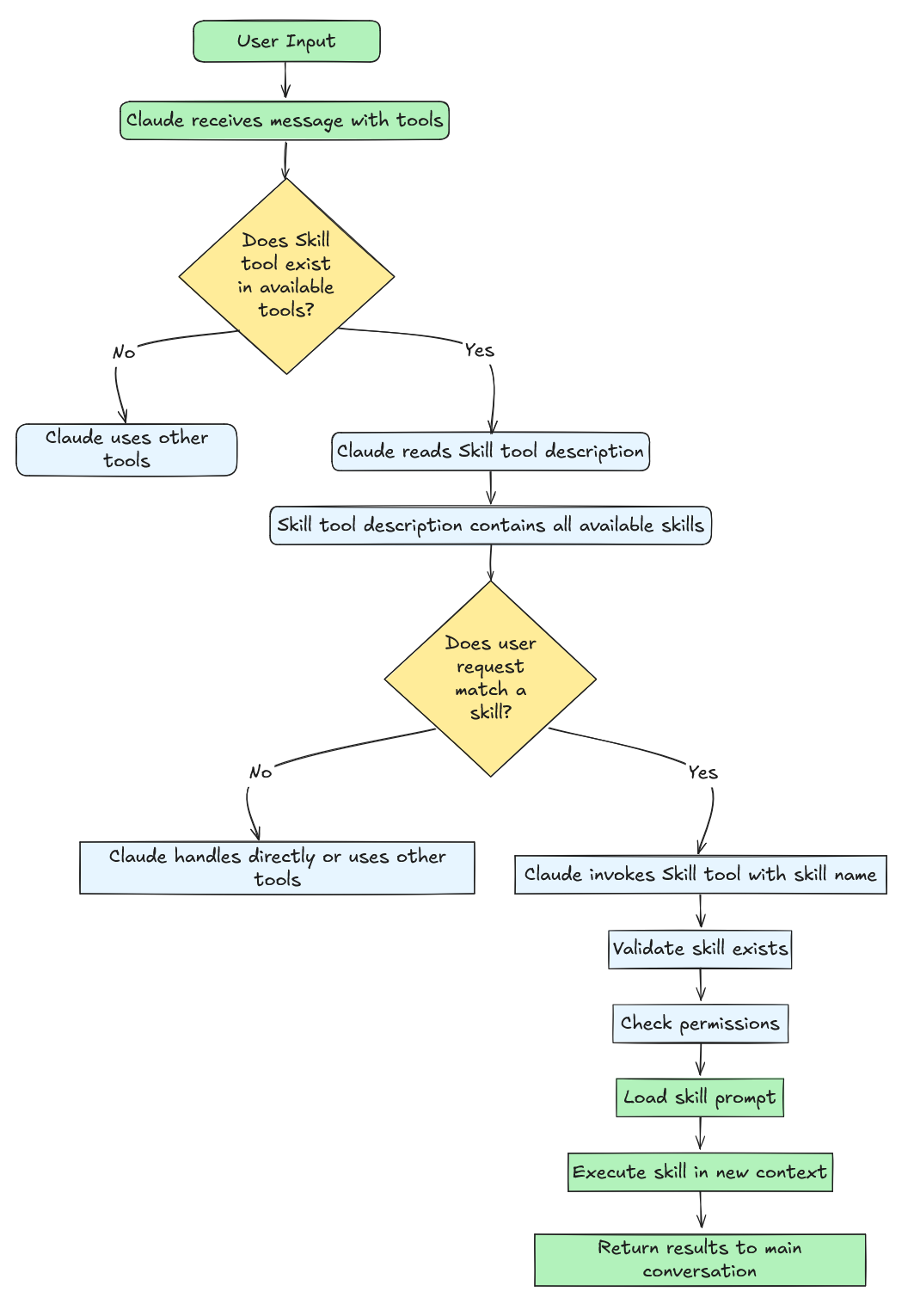
스킬 선택 메커니즘에는 코드 레벨의 알고리즘 라우팅이나 의도 분류가 없다. Claude Code는 어떤 스킬을 호출할지 결정하기 위해 임베딩, 분류기(classifier), 패턴 매칭을 사용하지 않는다. 대신 시스템은 사용 가능한 모든 스킬을
Skill도구의 프롬프트에 텍스트 설명으로 포매팅해 넣고, Claude의 언어 모델이 결정하게 한다. 이것은 순수한 LLM 추론이다. 정규식(regex)도 없고, 키워드 매칭도 없고, ML 기반 의도 감지도 없다. 결정은 애플리케이션 코드가 아니라 트랜스포머의 forward pass 내부에서 일어난다.
Claude가 스킬을 호출하면, 시스템은 간단한 워크플로를 따른다: 마크다운 파일(
SKILL.md)을 로드하고, 상세 지시로 확장하며, 그 지시를 새 사용자 메시지로 대화 컨텍스트에 주입하고, 실행 컨텍스트(허용 도구, 모델 선택)를 수정한 뒤, 이 풍부해진 환경에서 대화를 계속한다. 이는 결과를 실행하고 반환하는 전통적 도구와 근본적으로 다르다. 스킬은 문제를 직접 해결하기보다, Claude가 문제를 해결하도록 준비 시킨다.
아래 표는 Tools와 Skills 및 그 역량 차이를 구분하는 데 도움이 된다.
| 항목 | 전통적 도구(Traditional Tools) | 스킬(Skills) |
|---|---|---|
| 실행 모델 | 동기적, 직접 실행 | 프롬프트 확장 |
| 목적 | 특정 연산 수행 | 복잡한 워크플로 가이드 |
| 반환값 | 즉각적인 결과 | 대화 컨텍스트 + 실행 컨텍스트 변화 |
| 예시 | plaintext Read , plaintext Write , plaintext Bash | plaintext internal-comms , plaintext skill-creator |
| 동시성 | 대체로 안전 | 동시성-안전 아님 |
| 타입 | 다양함 | 항상 plaintext "prompt" |
이제 Anthropic의 스킬 저장소에 있는 plaintext skill-creator 스킬을 사례로 삼아, 스킬을 어떻게 만드는지 살펴보자. 다시 상기하자면, 에이전트
skills는 에이전트가 특정 작업을 더 잘 수행할 수 있도록 동적으로 발견하고 로드할 수 있는 지시, 스크립트, 리소스를 폴더로 구성한 것이다.
Skills는 여러분의 전문성을 Claude가 조합 가능한(composable) 리소스로 패키징해 Claude의 능력을 확장한다. 그 결과 범용 에이전트가 여러분의 필요에 맞춘 특화 에이전트로 변모한다.
핵심 인사이트: Skill = 프롬프트 템플릿 + 대화 컨텍스트 주입 + 실행 컨텍스트 수정 + (선택) 데이터 파일 및 Python 스크립트
모든
Skill은
SKILL.md(대소문자 무관)라는 마크다운 파일로 정의되며,
/scripts,
/references,
/assets아래에 선택적으로 번들 파일을 포함할 수 있다. 번들 파일은 Python 스크립트, 셸 스크립트, 폰트 정의, 템플릿 등일 수 있다.
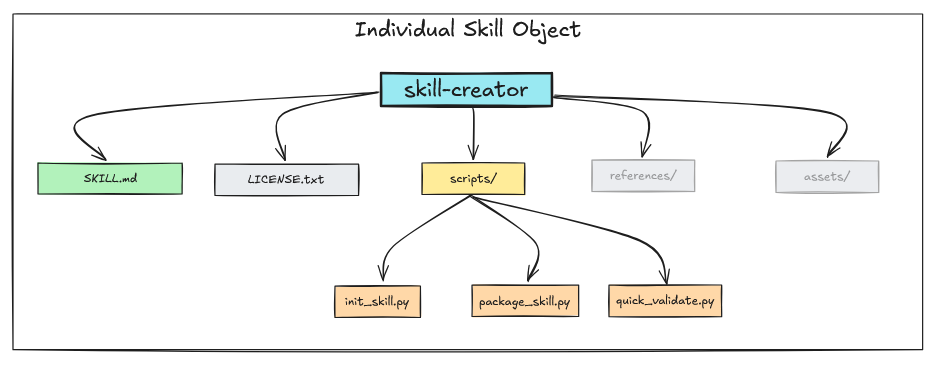
skill-creator를 예로 들면,
SILL.md, 라이선스를 위한
LICENSE.txt, 그리고
/scripts폴더 아래 몇 개의 Python 스크립트를 포함한다.
skill-creator에는
/references나
/assets가 없다.
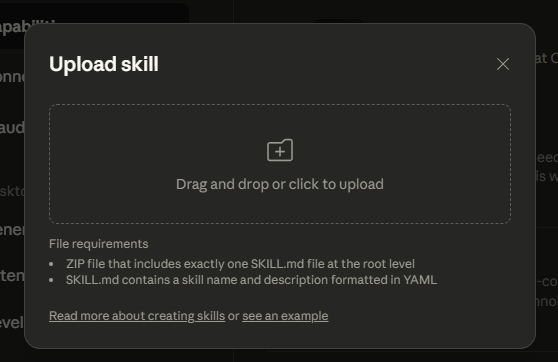
스킬은 여러 소스에서 발견되고 로드된다. Claude Code는 사용자 설정(
~/.config/claude/skills/), 프로젝트 설정(
.claude/skills/), 플러그인 제공 스킬, 내장 스킬을 스캔해 사용 가능한 스킬 목록을 만든다. Claude Desktop에서는 다음과 같이 커스텀 스킬을 업로드할 수 있다.
NOTE: 스킬을 만들 때 가장 중요한 개념은 점진적 공개(Progressive Disclosure) 다. 즉, 에이전트가 다음에 무엇을 해야 할지 판단하는 데 필요한 만큼만 정보를 보여주고, 필요해질 때 더 많은 디테일을 공개하는 방식이다.
agent skills의 경우:
- Frontmatter 공개: 최소(이름, 설명, 라이선스)
- 어떤
skill이 선택되면 SKILL.md 로드: 포괄적이지만 집중된 내용 3. 그리고
skill실행 중에 helper assets, references, scripts를 로드
SKILL.md는 스킬 프롬프트의 핵심이다. 이 파일은 frontmatter와 content의 두 부분 구조를 따르는 마크다운 파일이다. frontmatter는 스킬이 어떻게 실행되는지(권한, 모델, 메타데이터)를 설정하고, 마크다운 콘텐츠는 Claude가 무엇을 해야 하는지 알려준다. Frontmatter는 YAML로 작성되는 마크다운 파일의 헤더다.
┌─────────────────────────────────────┐
│ 1. YAML Frontmatter (Metadata)      │ ← 설정(Configuration)
│    ---                              │
│    name: skill-name                 │
│    description: Brief overview      │
│    allowed-tools: "Bash, Read"      │
│    version: 1.0.0                   │
│    ---                              │
├─────────────────────────────────────┤
│ 2. Markdown Content (Instructions)  │ ← Claude를 위한 프롬프트
│                                     │
│    Purpose explanation              │
│    Detailed instructions            │
│    Examples and guidelines          │
│    Step-by-step procedures          │
└─────────────────────────────────────┘
frontmatter에는 Claude가 스킬을 발견하고 사용하는 방식을 제어하는 메타데이터가 들어 있다. 예를 들어
skill-creator의 frontmatter는 다음과 같다:
---
name: skill-creator
description: Guide for creating effective skills. This skill should be used when users want to create a new skill (or update an existing skill) that extends Claude's capabilities with specialized knowledge, workflows, or tool integrations.
license: Complete terms in LICENSE.txt
---
이제 frontmatter의 필드를 하나씩 살펴보자.

name
 (필수)

이름 그대로다.
```plaintext
skill
의 이름.
skill의
name은
Skill Tool에서
command로 사용된다.
name는
Skill Tool에서
command로 사용된다.
description
 (필수)

```plaintext
description
필드는 스킬이 무엇을 하는지에 대한 간단한 요약을 제공한다. 이는 Claude가 언제 스킬을 호출할지 결정하는 데 사용하는 가장 중요한 신호다. 위 예시에서 description은 “사용자가 새 스킬을 만들고 싶을 때 사용해야 한다”라고 명시한다. 이런 명확하고 행동 지향적인 언어는 Claude가 사용자 의도를 스킬 능력과 매칭하는 데 도움이 된다.
시스템은 자동으로 description에 소스 정보를 덧붙인다(예:
"(plugin:skills)"). 이는 여러 소스에서 스킬이 동시에 로드될 때 스킬을 구분하는 데 도움을 준다.
when_to_use
 (문서화되지 않음—폐기 예정이거나 미래 기능일 가능성)

> **⚠️ 중요한 노트**:
> ```plaintext
> when_to_use
> ```
>  필드는 코드베이스에는 광범위하게 등장하지만, **공식 Anthropic 문서에는 전혀 문서화되어 있지 않다.** 이 필드는 다음 중 하나일 수 있다:
>
>
> *   점차 제거 중인(deprecated) 기능
> *   아직 공식 지원되지 않는 내부/실험 기능
> *   아직 릴리스되지 않은 계획된 기능
>
>
> **권장 사항**: 대신 상세한
> ```plaintext
> description
> ```
>  필드에 의존하라. 공식 문서에 등장하기 전까지 프로덕션 스킬에서는
> ```plaintext
> when_to_use
> ```
>  사용을 피하라.

문서화되어 있지 않지만, 현재 코드베이스에서
```plaintext
when_to_use
는 다음처럼 동작한다:
function formatSkill(skill) {
  let description = skill.whenToUse
    ? `${skill.description} - ${skill.whenToUse}`
    : skill.description;

  return `"${skill.name}": ${description}`;
}
존재할 경우
when_to_use는 하이픈으로 구분되어 description 뒤에 덧붙는다. 예:
"skill-creator": Create well-structured, reusable skills... - When user wants to build a custom skill package with scripts, references, or assets
Claude가 Skill tool 프롬프트에서 보는 것은 이 결합된 문자열이다. 하지만 이 동작은 문서화되어 있지 않으므로, 향후 릴리스에서 변경되거나 제거될 수 있다. 더 안전한 방법은
description필드에 사용 가이드를 직접 포함하는 것이다. 위의
skill-creator예시가 그 방식이다.
license
 (선택)

이름 그대로다.

#### ```plaintext
allowed-tools
(선택)
allowed-tools필드는 스킬이 사용자 승인 없이 사용할 수 있는 도구를 정의한다. Claude의 allowed-tools와 유사하다.
이는 콤마로 구분된 문자열이며, 파싱되어 허용 도구 이름 배열이 된다. 와일드카드로 권한 범위를 좁힐 수 있다. 예를 들어
Bash(git:*)는 git 서브커맨드만 허용하고,
Bash(npm:*)는 모든 npm 작업을 허용한다. skill-creator 스킬은
"Read,Write,Bash,Glob,Grep,Edit"를 사용해 광범위한 파일/검색 기능을 제공한다. 흔한 실수는 가능한 모든 도구를 나열하는 것으로, 이는 보안 위험을 키우고 보안 모델을 무력화한다.
스킬에 실제로 필요한 것만 포함하라—파일 읽기/쓰기만 한다면
"Read,Write"로 충분하다.
# ✅ skill-creator는 여러 도구 허용
allowed-tools: "Read,Write,Bash,Glob,Grep,Edit"

# ✅ 특정 git 명령만 허용
allowed-tools: "Bash(git status:*),Bash(git diff:*),Bash(git log:*),Read,Grep"

# ✅ 파일 작업만 허용
allowed-tools: "Read,Write,Edit,Glob,Grep"

# ❌ 불필요한 공격면
allowed-tools: "Bash,Read,Write,Edit,Glob,Grep,WebSearch,Task,Agent"

# ❌ 모든 npm 명령을 허용하는 불필요한 공격면
allowed-tools: "Bash(npm:*),Read,Write"
model
 (선택)

```plaintext
model
필드는 스킬이 사용할 모델을 정의한다. 기본값은 사용자 세션의 현재 모델을 상속하는 것이다. 코드 리뷰 같은 복잡한 작업의 경우, 스킬이 Claude Opus 같은 더 강력한 모델이나 기타 OSS 중국어 모델을 요청할 수 있다. 아는 사람은 안다(IYKYK).
model: "claude-opus-4-20250514"  # 특정 모델 사용
model: "inherit"                 # 세션의 현재 모델 사용(기본)
version
,
```plaintext
disable-model-invocation
, 그리고
mode(선택)
스킬은 버전 관리 및 호출 제어를 위한 세 가지 선택적 frontmatter 필드를 지원한다.
version필드(예: version: “1.0.0”)는 스킬 버전을 추적하기 위한 메타데이터로, frontmatter에서 파싱되지만 주로 문서화 및 스킬 관리 목적에 사용된다.
disable-model-invocation필드(boolean)는 Claude가
Skill도구를 통해 스킬을 자동 호출하는 것을 막는다. true로 설정되면 Claude에게 보여지는 목록에서 제외되며, 사용자가 /skill-name으로 수동 호출만 가능해진다. 위험한 작업, 설정 명령, 또는 사용자 명시적 제어가 필요한 대화형 워크플로에 적합하다.
mode필드(boolean)는 스킬을 Claude의 동작이나 컨텍스트를 변경하는 “모드 명령(mode command)”으로 분류한다. true로 설정하면 스킬 목록 상단의 별도 “Mode Commands” 섹션에 표시되어, debug-mode, expert-mode, review-mode처럼 특정 운영 컨텍스트나 워크플로를 설정하는 스킬을 눈에 띄게 만든다.
frontmatter 다음에는 마크다운 콘텐츠—즉,
skill이 호출될 때 Claude가 받는 실제 프롬프트가 온다. 여기에서 스킬의 행동, 지시, 워크플로를 정의한다. 효과적인 스킬 프롬프트의 핵심은 집중도를 유지하고 점진적 공개를 사용하는 것이다: 핵심 지시는 SKILL.md에 두고, 상세 내용은 외부 파일을 참조하라.
권장되는 콘텐츠 구조는 다음과 같다.
---
# Frontmatter here
---

# [간단한 목적 문장 - 1~2문장]

## Overview
[이 스킬이 무엇을 하는지, 언제 쓰는지, 무엇을 제공하는지]

## Prerequisites
[필요한 도구, 파일, 또는 컨텍스트]

## Instructions

### Step 1: [첫 번째 액션]
[명령형 지시]
[필요하다면 예시]

### Step 2: [다음 액션]
[명령형 지시]

### Step 3: [마지막 액션]
[명령형 지시]

## Output Format
[결과를 어떻게 구성할지]

## Error Handling
[실패 시 어떻게 할지]

## Examples
[구체적인 사용 예시]

## Resources
[번들된 scripts/, references/, assets/ 안내]
예를 들어
skill-creator스킬은 스킬 생성에 필요한 워크플로의 각 단계를 명시하는 다음 지시를 포함한다.
## Skill Creation Process

### Step 1: Understanding the Skill with Concrete Examples
### Step 2: Planning the Reusable Skill Contents
### Step 3: Initializing the Skill
### Step 4: Edit the Skill
### Step 5: Packaging a Skill
Claude가 이 스킬을 호출하면, 베이스 디렉터리 경로가 앞에 붙은 상태로 전체 프롬프트를 새로운 지시로 받는다.
{baseDir}변수는 스킬 설치 디렉터리로 해석되어, Claude가 Read 도구로 참조 파일을 로드할 수 있게 해준다:
Read({baseDir}/scripts/init_skill.py). 이 패턴은 메인 프롬프트를 간결하게 유지하면서도 필요 시 상세 문서를 온디맨드로 이용 가능하게 만든다.
프롬프트 콘텐츠 베스트 프랙티스:
{baseDir}사용.
/home/user/project/같은 절대경로 하드코딩 금지
❌ Read /home/user/project/config.json
✅ Read {baseDir}/config.json
스킬이 호출되면, Claude는
allowed-tools에 지정된 도구만 사용할 수 있으며, frontmatter에 지정된 경우 모델도 덮어쓸 수 있다. 스킬의 base directory 경로가 자동으로 제공되므로, 번들 리소스에 접근할 수 있다.
Skills는 SKILL.md와 함께 지원 리소스를 번들링하면 강력해진다. 표준 구조는 세 개의 디렉터리를 사용하며, 각각 명확한 목적을 갖는다.
my-skill/
├── SKILL.md              # 핵심 프롬프트 및 지시
├── scripts/              # 실행 가능한 Python/Bash 스크립트
├── references/           # 컨텍스트로 로드되는 문서
└── assets/               # 템플릿 및 바이너리 파일
왜 리소스를 번들링하나? SKILL.md를 간결하게(5,000단어 이하) 유지하면 Claude의 컨텍스트 윈도우를 압도하지 않는다. 번들 리소스는 메인 프롬프트를 비대하게 만들지 않고도 상세 문서, 자동화 스크립트, 템플릿을 제공하게 해준다. Claude는 점진적 공개 방식으로 필요할 때만 로드한다.
scripts/디렉터리
scripts/디렉터리에는 Claude가 Bash 도구를 통해 실행하는 코드—자동화 스크립트, 데이터 처리기, 검증기, 코드 생성기 등 결정론적(deterministic) 작업을 수행하는 실행 코드가 들어간다.
예를 들어
skill-creator의 SKILL.md는 다음처럼 스크립트를 참조한다:
When creating a new skill from scratch, always run the `init_skill.py` script. The script conveniently generates a new template skill directory that automatically includes everything a skill requires, making the skill creation process much more efficient and reliable.

Usage:

```scripts/init_skill.py <skill-name> --path <output-directory>```

The script:
  - Creates the skill directory at the specified path
  - Generates a SKILL.md template with proper frontmatter and TODO placeholders
  - Creates example resource directories: scripts/, references/, and assets/
  - Adds example files in each directory that can be customized or deleted
Claude는 이 지시를 보면
python {baseDir}/scripts/init_skill.py를 실행한다.
{baseDir}변수는 스킬의 설치 경로로 자동 해석되어, 다양한 환경에서 스킬을 이식 가능하게 만든다.
scripts/를 쓰는 경우: 복잡한 다단계 작업, 데이터 변환, API 상호작용, 혹은 자연어보다 코드로 표현하는 편이 정확한 로직이 필요한 작업.
references/디렉터리
references/디렉터리는 Claude가 참조 지시에 따라 컨텍스트로 읽어들이는 문서를 저장한다. 텍스트 콘텐츠—마크다운 파일, JSON 스키마, 설정 템플릿, 작업을 완료하는 데 필요한 문서가 여기에 들어간다.
예를 들어
mcp-creator의 SKILL.md는 다음처럼 references를 참조한다:
#### 1.4 Study Framework Documentation

**Load and read the following reference files:**

- **MCP Best Practices**: [📋 View Best Practices](./reference/mcp_best_practices.md) - Core guidelines for all MCP servers

**For Python implementations, also load:**
- **Python SDK Documentation**: Use WebFetch to load `https://raw.githubusercontent.com/modelcontextprotocol/python-sdk/main/README.md`
- [🐍 Python Implementation Guide](./reference/python_mcp_server.md) - Python-specific best practices and examples

**For Node/TypeScript implementations, also load:**
- **TypeScript SDK Documentation**: Use WebFetch to load `https://raw.githubusercontent.com/modelcontextprotocol/typescript-sdk/main/README.md`
- [⚡ TypeScript Implementation Guide](./reference/node_mcp_server.md) - Node/TypeScript-specific best practices and examples
Claude는 이런 지시를 만나면 Read 도구를 사용한다:
Read({baseDir}/references/mcp_best_practices.md). 이렇게 로드된 내용은 SKILL.md를 복잡하게 만들지 않으면서도 상세 정보를 제공한다.
references/를 쓰는 경우: 상세 문서, 큰 패턴 라이브러리, 체크리스트, API 스키마 등 SKILL.md에는 너무 장황하지만 작업에 필요한 텍스트 콘텐츠.
assets/디렉터리
assets/디렉터리에는 Claude가 경로로만 참조하고 컨텍스트로 로드하지 않는 템플릿 및 바이너리 파일이 들어간다. 스킬의 정적 리소스라고 생각하면 된다: HTML 템플릿, CSS 파일, 이미지, 설정 보일러플레이트, 폰트 등.
SKILL.md에서:
Use the template at {baseDir}/assets/report-template.html as the report structure.
Reference the architecture diagram at {baseDir}/assets/diagram.png.
Claude는 파일 경로를 보지만 내용을 읽지는 않는다. 대신 템플릿을 새 위치로 복사해 플레이스홀더를 채우거나, 생성된 출력에서 해당 경로를 참조할 수 있다.
assets/를 쓰는 경우: HTML/CSS 템플릿, 이미지, 바이너리 파일, 설정 템플릿 등 컨텍스트로 읽기보다 “경로로 조작”하는 파일.
references/와
assets/의 핵심 차이는 다음과 같다.
이 구분은 컨텍스트 관리 측면에서 중요하다.
references/의 10KB 마크다운 파일은 로드 시 컨텍스트 토큰을 소비한다. 반면
assets/의 10KB HTML 템플릿은 토큰을 소비하지 않는다. Claude는 그저 경로가 존재한다는 사실만 안다.
베스트 프랙티스: 경로에는 항상
{baseDir}를 쓰고, 절대경로 하드코딩은 피하라. 이식성이 좋아진다.
엔지니어링에서 늘 그렇듯, 흔한 패턴을 이해하면 효과적인 스킬을 설계하는 데 도움이 된다. 아래는 도구 통합과 워크플로 설계에서 유용한 패턴들이다.
사용 사례: 여러 명령이 필요한 복잡 작업 또는 결정론적 로직 필요.
이 패턴은
scripts/디렉터리의 Python/Bash 스크립트로 계산 작업을 오프로딩한다. 스킬 프롬프트는 Claude에게 스크립트를 실행하고 출력물을 처리하라고 지시한다.

SKILL.md 예시:
Run scripts/analyzer.py on the target directory:

`python {baseDir}/scripts/analyzer.py --path "$USER_PATH" --output report.json`

Parse the generated `report.json` and present findings.
필요 도구:
allowed-tools: "Bash(python {baseDir}/scripts/*:*), Read, Write"
사용 사례: 파일 변환 및 데이터 처리.
가장 단순한 패턴—입력을 읽고, 지시에 따라 변환하고, 출력을 쓴다. 포맷 변환, 데이터 정리, 리포트 생성 등에 유용하다.
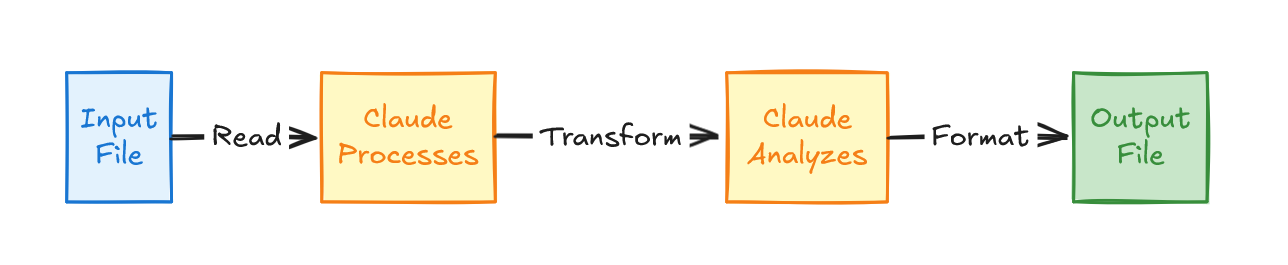
SKILL.md 예시:
## Processing Workflow
1. Read input file using Read tool
2. Parse content according to format
3. Transform data following specifications
4. Write output using Write tool
5. Report completion with summary
필요 도구:
allowed-tools: "Read, Write"
사용 사례: 코드베이스 분석 및 패턴 탐지.
Grep으로 코드베이스를 검색해 패턴을 찾고, 매칭 파일을 읽어 맥락을 확보한 뒤, 결과를 분석해 구조화된 리포트를 만든다. 또는 엔터프라이즈 데이터 스토어를 검색해 데이터를 얻고, 분석 후 구조화된 리포트를 생성할 수도 있다.
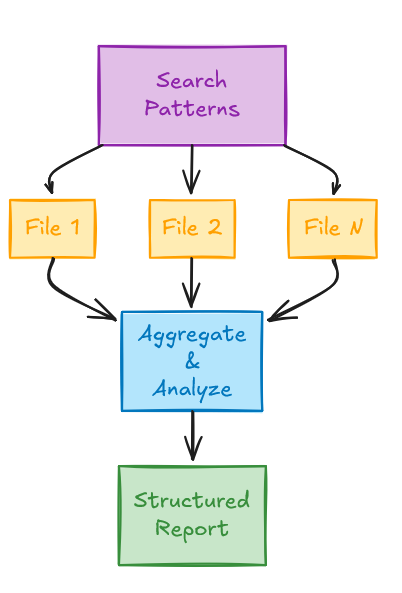
SKILL.md 예시:
## Analysis Process
1. Use Grep to find relevant code patterns
2. Read each matched file
3. Analyze for vulnerabilities
4. Generate structured report
필요 도구:
allowed-tools: "Grep, Read"
사용 사례: 의존성이 있는 다단계 작업.
각 단계가 이전 단계의 성공에 의존하는 커맨드 시퀀스를 실행한다. CI/CD 유사 워크플로에 흔하다.
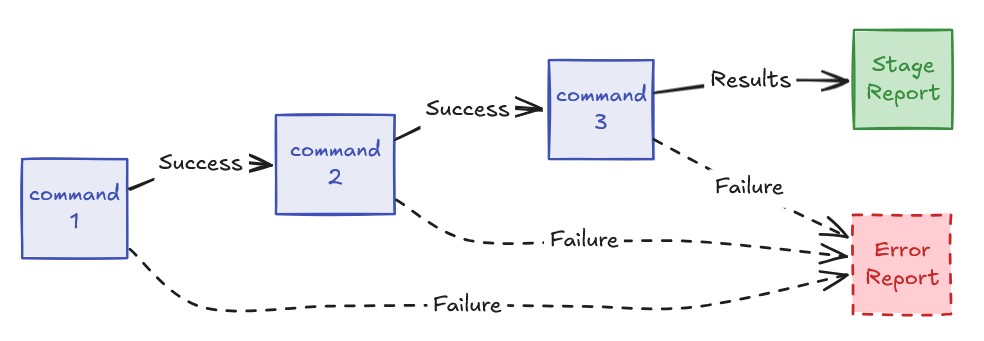
SKILL.md 예시:
Execute analysis pipeline:
npm install && npm run lint && npm test

Report results from each stage.
필요 도구:
allowed-tools: "Bash(npm install:*), Bash(npm run:*), Read"
사용 사례: 각 단계마다 사용자 입력이 필요한 복잡 프로세스.
복잡한 작업을 단계별로 쪼개고, 각 단계 사이에 사용자 확인을 명시적으로 요구한다. 셋업 위저드, 설정 도구, 가이드형 프로세스에 유용하다.
SKILL.md 예시:
## Workflow

### Step 1: Initial Setup
1. Ask user for project type
2. Validate prerequisites exist
3. Create base configuration
Wait for user confirmation before proceeding.

### Step 2: Configuration
1. Present configuration options
2. Ask user to choose settings
3. Generate config file
Wait for user confirmation before proceeding.

### Step 3: Initialization
1. Run initialization scripts
2. Verify setup successful
3. Report results
사용 사례:
assets/에 저장된 템플릿으로 구조화된 출력 만들기.
템플릿을 로드하고, 플레이스홀더를 사용자 제공 데이터나 생성 데이터로 채운 후 결과를 작성한다. 리포트 생성, 보일러플레이트 코드 생성, 문서화에 흔하다.
SKILL.md 예시:
## Generation Process
1. Read template from {baseDir}/assets/template.html
2. Parse user requirements
3. Fill template placeholders:
   -  → user-provided name
   -  → generated summary
   -  → current date
4. Write filled template to output file
5. Report completion
사용 사례: 깊이를 늘려가며 여러 번 패스가 필요한 프로세스.
먼저 넓게 스캔한 뒤, 발견된 이슈에 대해 점차 깊게 파고든다. 코드 리뷰, 보안 감사, 품질 분석에 유용하다.
SKILL.md 예시:
## Iterative Analysis

### Pass 1: Broad Scan
1. Search entire codebase for patterns
2. Identify high-level issues
3. Categorize findings

### Pass 2: Deep Analysis
For each high-level issue:
1. Read full file context
2. Analyze root cause
3. Determine severity

### Pass 3: Recommendation
For each finding:
1. Research best practices
2. Generate specific fix
3. Estimate effort

Present final report with all findings and recommendations.
사용 사례: 여러 소스의 정보를 결합해 종합적인 이해 구축.
여러 파일과 도구에서 데이터를 모아 하나의 일관된 그림으로 합성한다. 프로젝트 요약, 의존성 분석, 영향도 평가에 유용하다.
SKILL.md 예시:
## Context Gathering
1. Read project README.md for overview
2. Analyze package.json for dependencies
3. Grep codebase for specific patterns
4. Check git history for recent changes
5. Synthesize findings into coherent summary
개요와 구축 과정을 다뤘으니, 이제 스킬이 내부에서 실제로 어떻게 동작하는지 살펴보자. 스킬 시스템은
Skill이라는 도구가 모든 개별 스킬의 컨테이너이자 디스패처로 동작하는 메타-도구 아키텍처로 운영된다. 이 설계는 구현과 목적 모두에서 스킬을 전통적 도구와 근본적으로 구분한다.
Skill도구는 모든 스킬을 관리하는 메타-도구다
Read,
Bash,
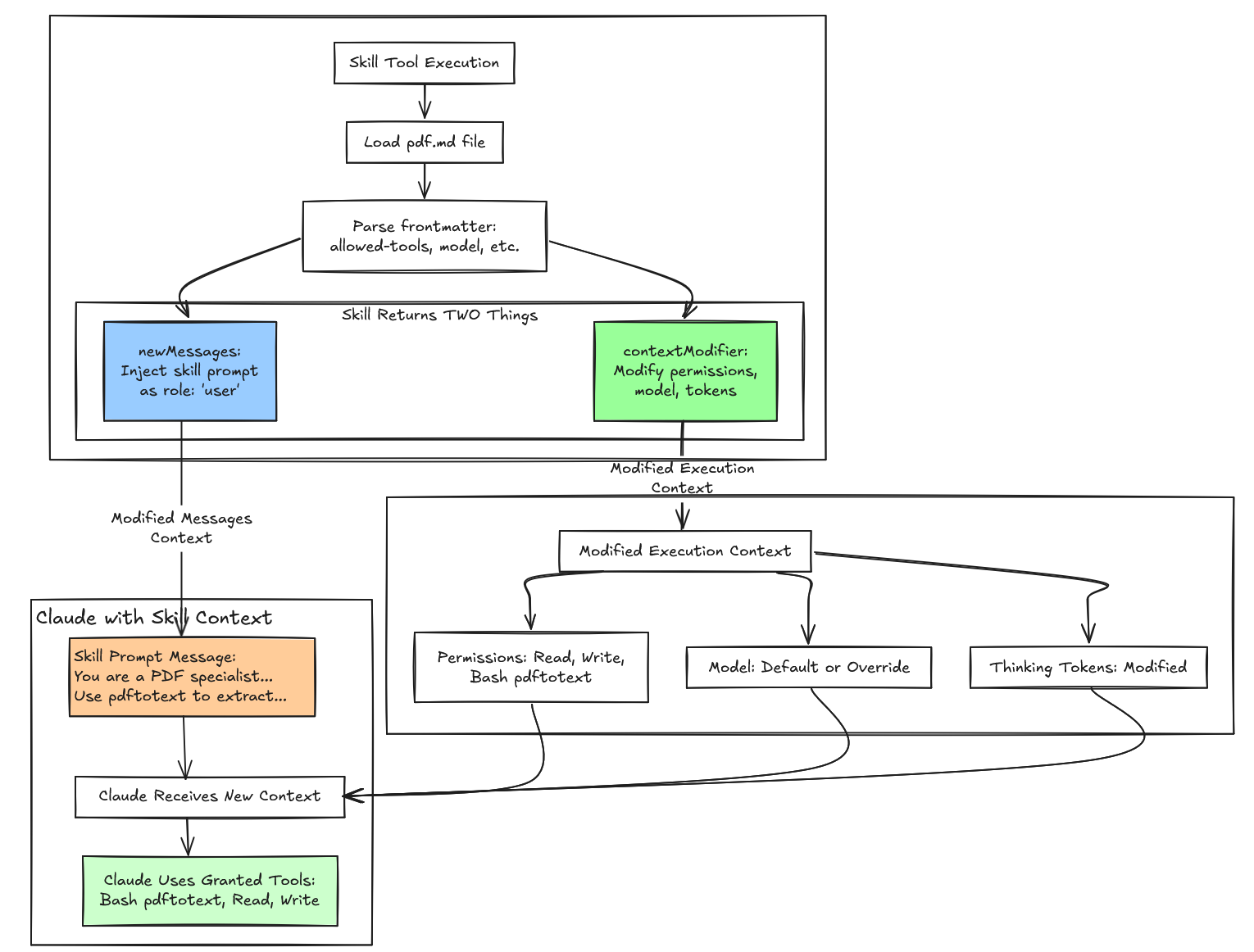
Write같은 전통적 도구는 개별 액션을 실행하고 즉각적인 결과를 반환한다. 스킬은 다르게 동작한다. 직접 액션을 수행하는 대신, 대화 히스토리에 특화 지시를 주입하고 Claude의 실행 환경을 동적으로 수정한다. 이는 두 개의 사용자 메시지(하나는 사용자에게 보이는 메타데이터, 다른 하나는 UI에는 숨겨지지만 Claude에는 전달되는 전체 스킬 프롬프트)와, 권한 변경/모델 전환/생각 토큰(thinking token) 파라미터 조정 같은 컨텍스트 변경을 통해 이루어진다.
| 기능 | 일반 도구 | Skill 도구 |
|---|---|---|
| 본질 | 직접 액션 실행기 | 프롬프트 주입 + 컨텍스트 수정기 |
| 메시지 역할 | assistant → tool_use user → tool_result | assistant → tool_use Skill user → tool_result user → skill prompt ← 주입됨! |
| 복잡도 | 단순(3~4 메시지) | 복잡(5~10+ 메시지) |
| 컨텍스트 | 정적 | 동적(턴마다 수정) |
| 지속성 | 도구 상호작용만 | 도구 상호작용 + 스킬 프롬프트 |
| 토큰 오버헤드 | 최소(~100 토큰) | 상당(~턴당 1,500+ 토큰) |
| 사용 사례 | 단순하고 직접적인 작업 | 복잡하고 가이드가 필요한 워크플로 |
복잡도는 상당하다. 일반 도구는 간단한 메시지 교환—어시스턴트의 도구 호출과 사용자의 결과—만 만든다. 반면 스킬은 여러 메시지를 주입하고, 동적으로 수정된 컨텍스트에서 동작하며, 전문 지시를 제공하기 위해 상당한 토큰 오버헤드를 가진다.
Skill메타-도구가 어떻게 동작하는지 이해하면 이 시스템의 메커니즘이 드러난다. 그 구조를 살펴보자:
Pd = {
  name: "Skill",  // The tool name constant: $N = "Skill"

  inputSchema: {
    command: string  // E.g., "pdf", "skill-creator"
  },

  outputSchema: {
    success: boolean,
    commandName: string
  },

  // 🔑 KEY FIELD: This generates the skills list
  prompt: async () => fN2(),

  // Validation and execution
  validateInput: async (input, context) => { /* 5 error codes */ },
  checkPermissions: async (input, context) => { /* allow/deny/ask */ },
  call: async *(input, context) => { /* yields messages + context modifier */ }
}
prompt필드는 Skill 도구를
Read나
Bash같은 정적 설명 도구와 구분한다. 고정 문자열 대신, Skill 도구는 런타임에 모든 사용 가능한 스킬의 이름과 설명을 집계해 도구 설명을 구성하는 동적 프롬프트 생성기를 사용한다. 이는 점진적 공개를 구현한다—시스템은 초기 컨텍스트에 최소 메타데이터(frontmatter의 이름/설명)만 로드해 Claude가 의도를 매칭할 만큼만 제공하고, Claude가 선택한 뒤에야 전체 스킬 프롬프트를 로드한다. 이로써 컨텍스트 팽창을 막으면서도 발견 가능성(discoverability)을 유지한다.
async function fN2() {
  let A = await atA(),
    {
      modeCommands: B,
      limitedRegularCommands: Q
    } = vN2(A),
    G = [...B, ...Q].map((W) => W.userFacingName()).join(", ");
  l(`Skills and commands included in Skill tool: ${G}`);
  let Z = A.length - B.length,
    Y = nS6(B),
    J = aS6(Q, Z);
  return `Execute a skill within the main conversation

<skills_instructions>
When users ask you to perform tasks, check if any of the available skills below can help complete the task more effectively. Skills provide specialized capabilities and domain knowledge.

How to use skills:
- Invoke skills using this tool with the skill name only (no arguments)
- When you invoke a skill, you will see <command-message>The "{name}" skill is loading</command-message>
- The skill's prompt will expand and provide detailed instructions on how to complete the task
- Examples:
  - \`command: "pdf"\` - invoke the pdf skill
  - \`command: "xlsx"\` - invoke the xlsx skill
  - \`command: "ms-office-suite:pdf"\` - invoke using fully qualified name

Important:
- Only use skills listed in <available_skills> below
- Do not invoke a skill that is already running
- Do not use this tool for built-in CLI commands (like /help, /clear, etc.)
</skills_instructions>

<available_skills>
${Y}${J}
</available_skills>
`;
}
ChatGPT 같은 일부 어시스턴트에서는 어떤 도구가 시스템 프롬프트에 들어가기도 하지만, Claude agent skills는 시스템 프롬프트에 있지 않다. 스킬은
tools배열의
Skill도구 설명 안에 있다. 개별 스킬 이름은
Skill메타-도구 입력 스키마의
command필드로 표현된다. 이를 시각화하기 위해 실제 API 요청 구조를 보자.
{
  "model": "claude-sonnet-4-5-20250929",
  "system": "You are Claude Code, Anthropic's official CLI...",  // ← System prompt
  "messages": [
    {"role": "user", "content": "Help me create a new skill"},
    // ... conversation history
  ],
  "tools": [  // ← Tools array sent to Claude
    {
      "name": "Skill",  // ← The meta-tool
      "description": "Execute a skill...\n\n<skills_instructions>...\n\n<available_skills>\n...",
      "input_schema": {
        "type": "object",
        "properties": {
          "command": {
            "type": "string",
            "description": "The skill name (no arguments)"  // ← Name of individual skill
          }
        }
      }
    },
    {
      "name": "Bash",
      "description": "Execute bash commands...",
      // ...
    },
    {
      "name": "Read",
      // ...
    }
    // ... other tools
  ]
}
<available_skills>섹션은 Skill 도구의 description 안에 있으며, 각 API 요청마다 재생성된다. 시스템은 현재 로드된 스킬을 사용자/프로젝트 설정, 플러그인 제공 스킬, 내장 스킬에서 동적으로 집계하되, 기본 15,000자 토큰 예산 제한을 받는다. 이 예산 제약은 스킬 작성자가 간결한 설명을 쓰도록 강제하며, 도구 설명이 모델의 컨텍스트 윈도우를 압도하지 않도록 보장한다.
대부분의 LLM API는 이론적으로 시스템 프롬프트를 담을 수 있는
role: "system"메시지를 지원한다. 실제로 OpenAI의 ChatGPT는 기본 도구를 시스템 프롬프트에 담는다(메모리용
bio, 작업 스케줄링용
automations, 캔버스 제어용
canmore, 이미지 생성용
img_gen,
file_search,
python, 인터넷 검색용
web등). 그리고 시스템 프롬프트 토큰의 약 90%가 도구 프롬프트가 차지한다. 도구/스킬이 많을 때 유용할 수 있지만 효율적이진 않다.
하지만 시스템 메시지는 스킬에 부적합한 의미론을 가진다. 시스템 메시지는 대화 전체에 걸쳐 지속되는 전역 컨텍스트를 설정하며, 사용자 지시보다 높은 권위를 갖고 이후 모든 턴에 영향을 미친다.
스킬은 일시적이고 범위가 제한된 동작이 필요하다.
skill-creator스킬은 스킬 생성 관련 작업에만 영향을 주어야지, 세션 내내 Claude를 영구적인 PDF 전문가로 만들어서는 안 된다.
role: "user"에
isMeta: true를 사용하면 스킬 프롬프트가 Claude에게 사용자 입력처럼 보이므로, 현재 상호작용에만 국한된 임시 효과를 갖는다. 스킬이 끝나면, 대화는 잔존 행동 수정 없이 정상 컨텍스트와 실행 컨텍스트로 돌아간다.
Read,
Write,
Bash같은 일반 도구는 통신 패턴이 단순하다. Claude가
Read를 호출하면 파일 경로를 보내고, 파일 내용을 받고, 계속 작업한다. 사용자는 트랜스크립트에서 “Claude가 Read 도구를 사용함”을 보고, 그 정도 투명성으로 충분하다. 도구는 한 가지 일을 하고 결과를 반환하면 상호작용이 끝난다. 스킬은 근본적으로 다르다. 스킬은 개별 액션을 실행하고 결과를 반환하는 것이 아니라, Claude가 과제를 추론하고 접근하는 방식을 바꾸는 포괄적인 지시 세트를 주입한다. 이로 인해 일반 도구에는 없는 설계 과제가 생긴다: 사용자는 어떤 스킬이 실행 중인지, 무엇을 하는지에 대한 투명성이 필요하지만, Claude는 올바르게 수행하기 위한 상세하고 때로는 장황한 지시가 필요하다. 사용자에게 전체 스킬 프롬프트를 보여주면 UI가 수천 단어의 내부 지시로 지저분해진다. 반대로 스킬 활성화를 전부 숨기면 사용자는 시스템이 무엇을 대신 하고 있는지 알 수 없다. 해결책은 서로 다른 가시성 규칙을 갖는 별도 메시지로 이 두 채널을 분리하는 것이다.
스킬 시스템은 각 메시지에
isMeta플래그를 사용해 UI에 표시할지 여부를 제어한다.
isMeta: false(또는 생략되어 기본값 false)이면 사용자가 보는 대화 트랜스크립트에 렌더링된다.
isMeta: true이면 메시지는 Claude의 대화 컨텍스트 일부로 Anthropic API에 전송되지만 UI에는 나타나지 않는다. 이 단순한 불리언 플래그 하나로, 사람 사용자용 스트림과 AI 모델용 스트림이라는 정교한 이중 채널 커뮤니케이션이 가능해진다. 메타-도구를 위한 메타-프롬프트(meta-prompting)다.
스킬이 실행되면, 시스템은 대화 히스토리에 두 개의 사용자 메시지를 주입한다. 첫 번째는
isMeta: false의 스킬 메타데이터로 사용자에게 상태 표시로 보인다. 두 번째는
isMeta: true의 전체 스킬 프롬프트로 UI에는 숨겨지지만 Claude에게 제공된다. 이렇게 분리하면 구현 상세로 사용자를 압도하지 않으면서도 무슨 일이 일어났는지 보여줄 수 있다.
메타데이터 메시지는 프론트엔드가 파싱하고 적절히 표시할 수 있는 간결한 XML 구조를 사용한다:
let metadata = [
  `<command-message>${statusMessage}</command-message>`,
  `<command-name>${skillName}</command-name>`,
  args ? `<command-args>${args}</command-args>` : null
].filter(Boolean).join('\n');

// Message 1: NO isMeta flag → defaults to false → VISIBLE
messages.push({
  content: metadata,
  autocheckpoint: checkpointFlag
});
예를 들어 PDF 스킬이 활성화되면, 사용자는 트랜스크립트에서 다음과 같은 깔끔한 로딩 표시를 본다:
<command-message>The "pdf" skill is loading</command-message>
<command-name>pdf</command-name>
<command-args>report.pdf</command-args>
이 메시지는 의도적으로 최소화된다(보통 50~200자). XML 태그는 프론트엔드가 특별한 포맷으로 렌더링하고, 올바른
<command-message>태그 존재를 검증하며, 세션 동안 어떤 스킬이 실행됐는지 감사 추적(audit trail)을 유지하는 데 도움을 준다.
isMeta플래그를 생략하면 기본값이 false이므로, 이 메타데이터는 자동으로 UI에 나타난다.
반대로 스킬 프롬프트 메시지는
SKILL.md의 전체 내용을 로드하고, 필요하면 추가 컨텍스트로 증강한 뒤,
isMeta: true를 명시해 사용자에게 숨긴다:
let skillPrompt = await skill.getPromptForCommand(args, context);

// Augment with prepend/append content if needed
let fullPrompt = prependContent.length > 0 || appendContent.length > 0
  ? [...prependContent, ...appendContent, ...skillPrompt]
  : skillPrompt;

// Message 2: Explicit isMeta: true → HIDDEN
messages.push({
  content: fullPrompt,
  isMeta: true  // HIDDEN FROM UI, SENT TO API
});
일반적인 스킬 프롬프트는 500~5,000단어이며 Claude의 행동을 변환하기 위한 포괄적 가이드를 제공한다. 예를 들어 PDF 스킬 프롬프트에는 다음이 포함될 수 있다:
You are a PDF processing specialist.

Your task is to extract text from PDF documents using the pdftotext tool.

## Process

1. Validate the PDF file exists
2. Run pdftotext command to extract text
3. Read the output file
4. Present the extracted text to the user

## Tools Available

You have access to:
- Bash(pdftotext:*) - For running pdftotext command
- Read - For reading extracted text
- Write - For saving results if needed

## Output Format

Present the extracted text clearly formatted.

Base directory: /path/to/skill
User arguments: report.pdf
이 프롬프트는 작업 컨텍스트를 설정하고, 워크플로를 개괄하며, 사용 가능한 도구를 지정하고, 출력 형식을 정의하고, 환경별 경로를 제공한다. 헤더/리스트/코드블록 등의 마크다운 구조는 Claude가 지시를 파싱하고 따르는 데 도움을 준다.
isMeta: true덕분에 전체 프롬프트는 API로 전송되지만 사용자 트랜스크립트를 어지럽히지 않는다.
핵심 메타데이터/스킬 프롬프트 외에도, 스킬은 첨부물(attachments)과 권한(permissions)을 위한 조건부 메시지를 추가로 주입할 수 있다:
let allMessages = [
  createMessage({ content: metadata, autocheckpoint: flag }),  // 1. Metadata
  createMessage({ content: skillPrompt, isMeta: true }),       // 2. Skill prompt
  ...attachmentMessages,                                       // 3. Attachments (conditional)
  ...(allowedTools.length || skill.model ? [
    createPermissionsMessage({                                 // 4. Permissions (conditional)
      type: "command_permissions",
      allowedTools: allowedTools,
      model: skill.useSmallFastModel ? getFastModel() : skill.model
    })
  ] : [])
];
첨부 메시지는 진단 정보, 파일 참조, 또는 스킬 프롬프트를 보완하는 추가 컨텍스트를 담을 수 있다. 권한 메시지는 스킬이 frontmatter에서
allowed-tools를 지정하거나 모델 오버라이드를 요청할 때만 나타나며, 런타임 실행 환경을 수정하는 메타데이터를 제공한다. 이런 모듈식 구성은 각 메시지가 명확한 목적을 갖게 하고, 스킬 설정에 따라 포함 여부를 결정할 수 있게 하며,
isMeta플래그를 통한 가시성 제어를 유지한 채 더 복잡한 시나리오를 다룰 수 있게 한다.
단일 메시지 설계라면 불가능한 선택을 강요하게 된다.
isMeta: false로 설정하면 전체 메시지가 사용자에게 보이므로, 수천 단어의 AI 지시가 트랜스크립트에 그대로 노출된다. 사용자는 다음 같은 것을 보게 된다:
┌─────────────────────────────────────────────┐
│ The "pdf" skill is loading                  │
│                                             │
│ You are a PDF processing specialist.        │
│                                             │
│ Your task is to extract text from PDF       │
│ documents using the pdftotext tool.         │
│                                             │
│ ## Process                                  │
│                                             │
│ 1. Validate the PDF file exists             │
│ 2. Run pdftotext command to extract text    │
│ 3. Read the output file                     │
│ ... [500 more lines] ...                    │
└─────────────────────────────────────────────┘
UI는 Claude를 위한 내부 구현 디테일로 가득 차 사용 불가능해진다. 반대로
isMeta: true로 설정하면 모든 것이 숨겨져, 어떤 스킬이 활성화되었는지, 어떤 인자를 받았는지에 대한 투명성이 사라진다.
두 메시지 분리는 각 메시지에 서로 다른
isMeta값을 부여함으로써 이를 해결한다. 1번 메시지(
isMeta: false)는 사용자에게 투명성을 제공하고, 2번 메시지(
isMeta: true)는 Claude에게 상세 지시를 제공한다. 이 미세한 제어로 정보 과부하 없이 투명성을 확보한다.
두 메시지는 대상과 목적이 근본적으로 다르다:
| 항목 | 메타데이터 메시지 | 스킬 프롬프트 메시지 |
|---|---|---|
| 대상 | 사람 사용자 | Claude(AI) |
| 목적 | 상태/투명성 | 지시/가이드 |
| 길이 | 약 50~200자 | 약 500~5,000단어 |
| 형식 | 구조화된 XML | 자연어 마크다운 |
| 가시성 | 보여야 함 | 숨겨야 함 |
| 내용 | “무슨 일이 일어나고 있나?” | “어떻게 해야 하나?” |
코드베이스는 이 메시지들을 서로 다른 경로로 처리하기까지 한다. 메타데이터 메시지는
<command-message>태그를 파싱하고 검증하며 UI 표시를 위해 포맷팅된다. 스킬 프롬프트 메시지는 파싱/검증 없이 그대로 API로 전송된다—Claude의 추론에만 필요한 순수 지시 콘텐츠다. 이를 합치면 하나의 메시지가 서로 다른 두 처리 파이프라인에서 두 대상에게 두 목적을 동시에 수행해야 하므로 단일 책임 원칙(SRP)을 위반하게 된다.
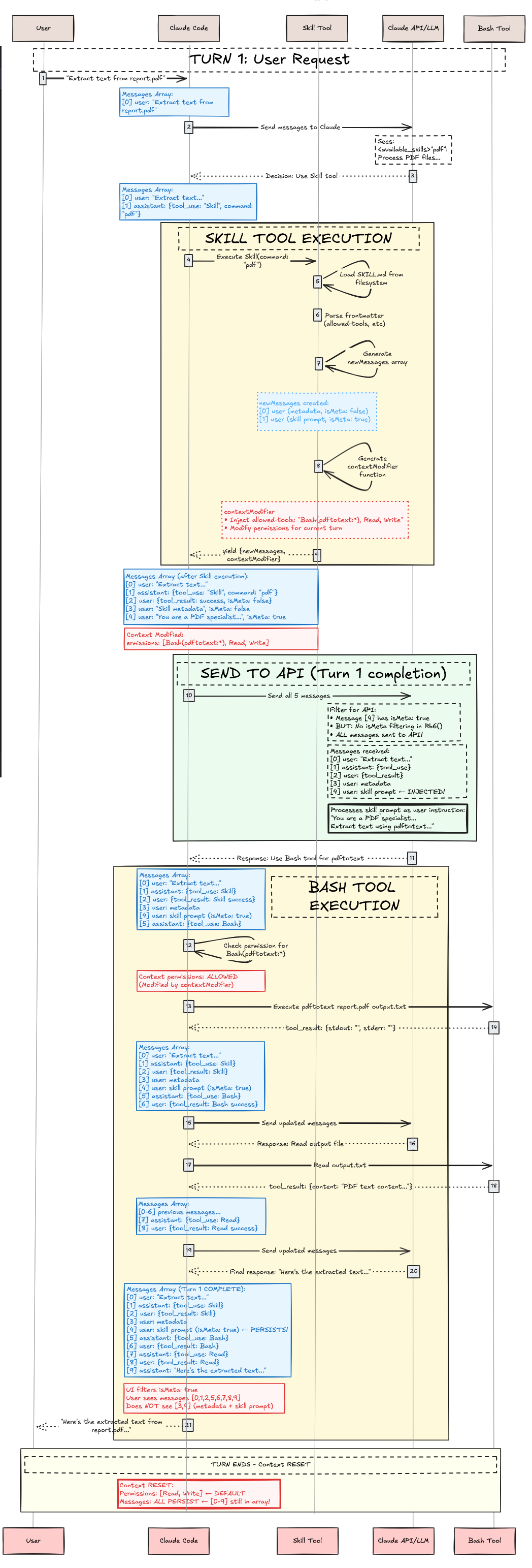
이제 내부 아키텍처를 다뤘으니, 가상의
pdf스킬을 사례로 사용자가 “report.pdf에서 텍스트를 추출해줘”라고 말했을 때 전체 실행 흐름이 어떻게 진행되는지 살펴보자.
Claude Code가 시작되면 스킬을 스캔한다:
async function getAllCommands() {
  // Load from all sources in parallel
  let [userCommands, skillsAndPlugins, pluginCommands, builtins] =
    await Promise.all([
      loadUserCommands(),      // ~/.claude/commands/
      loadSkills(),            // .claude/skills/ + plugins
      loadPluginCommands(),    // Plugin-defined commands
      getBuiltinCommands()     // Hardcoded commands
    ]);

  return [...userCommands, ...skillsAndPlugins, ...pluginCommands, ...builtins]
    .filter(cmd => cmd.isEnabled());
}

// Specific skill loading
async function loadPluginSkills(plugin) {
  // Check if plugin has skills
  if (!plugin.skillsPath) return [];

  // Two patterns supported:
  // 1. Root SKILL.md in skillsPath
  // 2. Subdirectories with SKILL.md

  const skillFiles = findSkillMdFiles(plugin.skillsPath);
  const skills = [];

  for (const file of skillFiles) {
    const content = readFile(file);
    const { frontmatter, markdown } = parseFrontmatter(content);

    skills.push({
      type: "prompt",
      name: `${plugin.name}:${getSkillName(file)}`,
      description: `${frontmatter.description} (plugin:${plugin.name})`,
      whenToUse: frontmatter.when_to_use,  // ← Note: underscores!
      allowedTools: parseTools(frontmatter['allowed-tools']),
      model: frontmatter.model === "inherit" ? undefined : frontmatter.model,
      isSkill: true,
      promptContent: markdown,
      // ... other fields
    });
  }

  return skills;
}
pdf 스킬의 경우 다음이 생성된다:
{
  type: "prompt",
  name: "pdf",
  description: "Extract text from PDF documents (plugin:document-tools)",
  whenToUse: "When user wants to extract or process text from PDF files",
  allowedTools: ["Bash(pdftotext:*)", "Read", "Write"],
  model: undefined,  // Uses session model
  isSkill: true,
  disableModelInvocation: false,
  promptContent: "You are a PDF processing specialist...",
  // ... other fields
}
사용자는 “report.pdf에서 텍스트를 추출해줘”라고 요청한다. Claude는 이 메시지와 함께 tools 배열에 있는
Skill도구를 받는다. Claude가 pdf 스킬 호출 여부를 결정하려면, 먼저 시스템이 Skill 도구 설명에 사용 가능한 스킬을 제시해야 한다.
로드된 스킬이 모두 Skill 도구에 나타나는 것은 아니다. 스킬은 frontmatter에
description또는
when_to_use중 하나가 반드시 있어야 하며, 그렇지 않으면 필터링된다. 필터링 기준:
async function getSkillsForSkillTool() {
  const allCommands = await getAllCommands();

  return allCommands.filter(cmd =>
    cmd.type === "prompt" &&
    cmd.isSkill === true &&
    !cmd.disableModelInvocation &&
    (cmd.source !== "builtin" || cmd.isModeCommand === true) &&
    (cmd.hasUserSpecifiedDescription || cmd.whenToUse)  // ← Must have one!
  );
}
각 스킬은
<available_skills>섹션에 맞게 포매팅된다. 예를 들어 가상의
pdf스킬은 다음처럼 포매팅될 수 있다.
"pdf": Extract text from PDF documents - When user wants to extract or process text from PDF filesfunction formatSkill(skill) {
let name = skill.name;
let description = skill.whenToUse
? `${skill.description} - ${skill.whenToUse}`
: skill.description;
return `"${name}": ${description}`;
}
이제 사용자 프롬프트가 “report.pdf에서 텍스트를 추출해줘”라면, Claude는
Skill도구가 포함된 API 요청을 받고,
<available_skills>를 읽고, (추론 트레이스는 보이지 않지만) 다음처럼 추론한다:
Internal reasoning:
- User wants to "extract text from report.pdf"
- This is a PDF processing task
- Looking at available skills...
- "pdf": Extract text from PDF documents - When user wants to extract or process text from PDF files
- This matches! The user wants to extract text from a PDF
- Decision: Invoke Skill tool with command="pdf"
여기에는 알고리즘적 매칭이 없다. 어휘 매칭도, 의미 매칭도, 검색도 없다. 스킬 설명에 기반한 순수 LLM 추론이다. Claude는 다음과 같은 tool use를 반환한다:
{
  "type": "tool_use",
  "id": "toolu_123abc",
  "name": "Skill",
  "input": {
    "command": "pdf"
  }
}
이제 Skill 도구가 실행된다. 이는 시퀀스 다이어그램에서 노란색 “SKILL TOOL EXECUTION” 박스에 해당하며, 결과를 반환하기 전에 검증, 권한 체크, 파일 로딩, 컨텍스트 수정을 수행한다.
async validateInput({ command }, context) {
  let skillName = command.trim().replace(/^\//, "");

  // Error 1: Empty
  if (!skillName) return { result: false, errorCode: 1 };

  // Error 2: Unknown skill
  const allSkills = await getAllCommands();
  if (!skillExists(skillName, allSkills)) {
    return { result: false, errorCode: 2 };
  }

  // Error 3: Can't load
  const skill = getSkill(skillName, allSkills);
  if (!skill) return { result: false, errorCode: 3 };

  // Error 4: Model invocation disabled
  if (skill.disableModelInvocation) {
    return { result: false, errorCode: 4 };
  }

  // Error 5: Not prompt-based
  if (skill.type !== "prompt") {
    return { result: false, errorCode: 5 };
  }

  return { result: true };
}
pdf 스킬은 모든 검증을 통과한다 ✓
async checkPermissions({ command }, context) {
  const skillName = command.trim().replace(/^\//, "");
  const permContext = (await context.getAppState()).toolPermissionContext;

  // Check deny rules
  for (const [pattern, rule] of getDenyRules(permContext)) {
    if (matches(skillName, pattern)) {
      return { behavior: "deny", message: "Blocked by permission rules" };
    }
  }

  // Check allow rules
  for (const [pattern, rule] of getAllowRules(permContext)) {
    if (matches(skillName, pattern)) {
      return { behavior: "allow" };
    }
  }

  // Default: ask user
  return { behavior: "ask", message: `Execute skill: ${skillName}` };
}
규칙이 없다면 사용자는 “Execute skill: pdf?”라는 프롬프트를 받는다.
사용자가 승인 ✓
검증과 권한이 승인되면 Skill 도구는 스킬 파일을 로드하고 실행 컨텍스트 수정을 준비한다:
async *call({ command }, context) {
  const skillName = command.trim().replace(/^\//, "");
  const allSkills = await getAllCommands();
  const skill = getSkill(skillName, allSkills);

  // Load the skill prompt
  const promptContent = await skill.getPromptForCommand("", context);

  // Generate metadata tags
  const metadata = [
    `<command-message>The "${skill.userFacingName()}" skill is loading</command-message>`,
    `<command-name>${skill.userFacingName()}</command-name>`
  ].join('\n');

  // Create messages
  const messages = [
    { type: "user", content: metadata },  // Visible to user
    { type: "user", content: promptContent, isMeta: true },  // Hidden from user, visible to Claude
    // ... attachments, permissions
  ];

  // Extract configuration
  const allowedTools = skill.allowedTools || [];
  const modelOverride = skill.model;

  // Yield result with execution context modifier
  yield {
    type: "result",
    data: { success: true, commandName: skillName },
    newMessages: messages,

    // 🔑 Execution context modification function
    contextModifier(context) {
      let modified = context;

      // Inject allowed tools
      if (allowedTools.length > 0) {
        modified = {
          ...modified,
          async getAppState() {
            const state = await context.getAppState();
            return {
              ...state,
              toolPermissionContext: {
                ...state.toolPermissionContext,
                alwaysAllowRules: {
                  ...state.toolPermissionContext.alwaysAllowRules,
                  command: [
                    ...state.toolPermissionContext.alwaysAllowRules.command || [],
                    ...allowedTools  // ← Pre-approve these tools
                  ]
                }
              }
            };
          }
        };
      }

      // Override model
      if (modelOverride) {
        modified = {
          ...modified,
          options: {
            ...modified.options,
            mainLoopModel: modelOverride
          }
        };
      }

      return modified;
    }
  };
}
Skill 도구는
newMessages(메타데이터 + 스킬 프롬프트 + 권한: 대화 컨텍스트 주입)와
contextModifier(도구 권한 + 모델 오버라이드: 실행 컨텍스트 수정)을 포함하는 결과를 yield한다. 이로써 시퀀스 다이어그램의 노란색 “SKILL TOOL EXECUTION” 박스가 완료된다.
시스템은 Anthropic API로 보낼 전체 messages 배열을 구성한다. 여기에는 기존 대화 메시지와 새로 주입된 스킬 메시지가 포함된다:
// Complete message array sent to API for Turn 1
{
  model: "claude-sonnet-4-5-20250929",
  messages: [
    {
      role: "user",
      content: "Extract text from report.pdf"
    },
    {
      role: "assistant",
      content: [
        {
          type: "tool_use",
          id: "toolu_123abc",
          name: "Skill",
          input: { command: "pdf" }
        }
      ]
    },
    {
      role: "user",
      content: "<command-message>The \"pdf\" skill is loading</command-message>\n<command-name>pdf</command-name>"
      // isMeta: false (default) - VISIBLE to user in UI
    },
    {
      role: "user",
      content: "You are a PDF processing specialist...\n\n## Process\n1. Validate PDF exists\n2. Run pdftotext...",
      isMeta: true  // HIDDEN from UI, sent to API
    },
    {
      role: "user",
      content: {
        type: "command_permissions",
        allowedTools: ["Bash(pdftotext:*)", "Read", "Write"],
        model: undefined
      }
    }
  ]
}
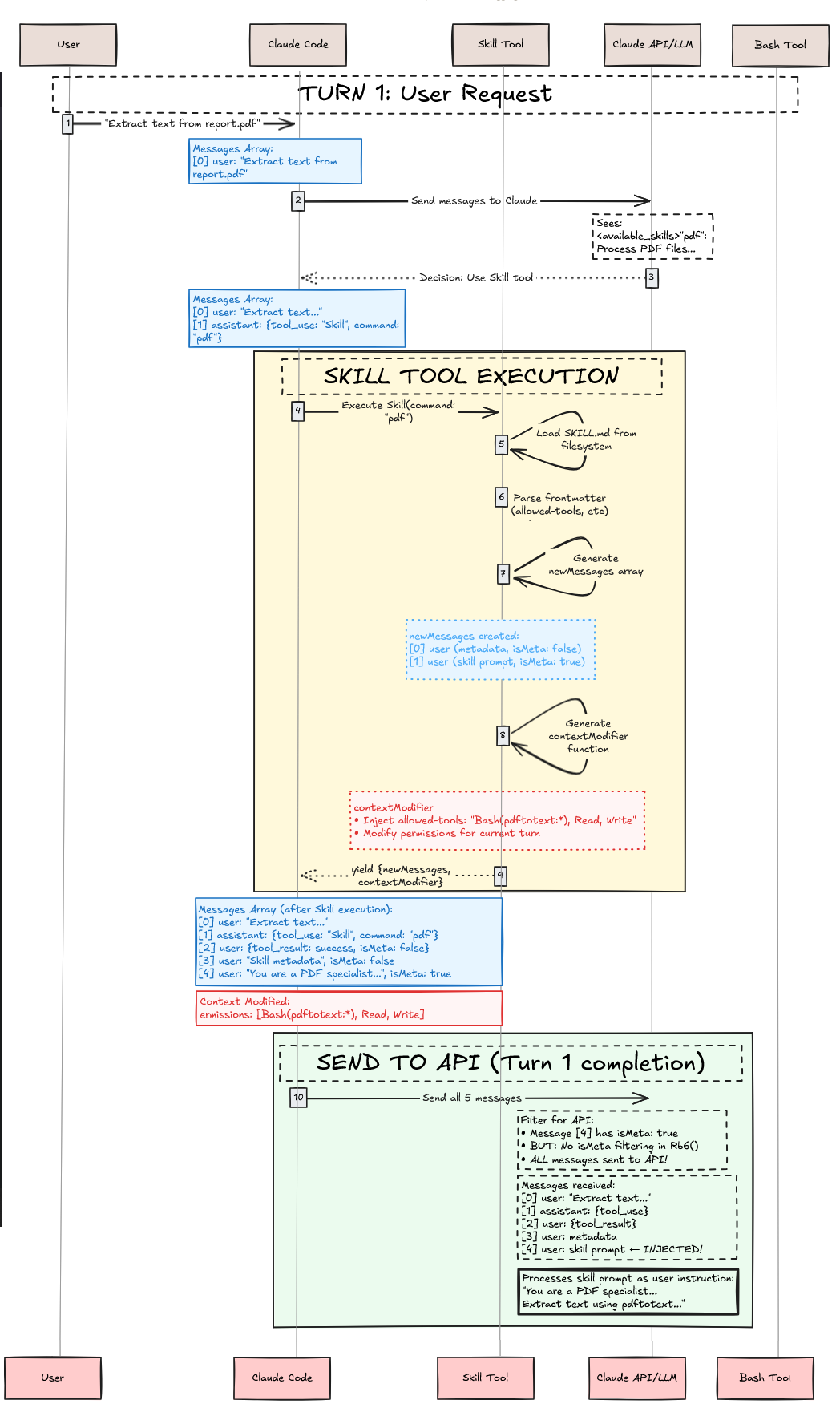
위는 지금까지 수행한 내용을 보여준다. 실행 컨텍스트 수정이 적용되어, 이후 도구 호출에서
Bash(pdftotext:*),
Read,
Write가 사전 승인된다. 요청이 Anthropic API로 전송된다. 이것으로 스킬 실행은 끝난다. 일반 도구라면 여기서 끝이지만, 스킬은 다르다. 에이전트 스킬은 대화 컨텍스트와 실행 컨텍스트만 주입했을 뿐이다. 즉, 이 주입된 컨텍스트를 모두 포함한 상태로 Claude 에이전트를 다시 구동해 사용자의 요청을 완료해야 한다!
Claude는 주입된 대화 컨텍스트가 포함된 API 응답을 받는다. 스킬 프롬프트는 Claude의 행동을 다음과 같이 변환했다:
Bash(pdftotext:*),
Read,
Write도구에 대한 사전 승인 접근(실행 컨텍스트)
Claude는 컨텍스트를 처리하고 pdf 스킬의 워크플로를 따른다:
I'll extract text from report.pdf. Let me process the file.

[Following pdf skill's instructions]
1. Validate that report.pdf exists
2. Run pdftotext command to extract text
3. Read the output file
4. Present the extracted text to you
Claude는 Bash 도구를 사용한다(사전 승인되어 사용자 프롬프트가 필요 없음):
{
  "type": "tool_use",
  "id": "toolu_456def",
  "name": "Bash",
  "input": {
    "command": "pdftotext report.pdf output.txt",
    "description": "Extract text from PDF using pdftotext"
  }
}
Bash 도구는 성공적으로 실행되고 결과를 반환한다. Claude는 이어서 Read 도구로 출력 파일을 읽고, 추출된 텍스트를 사용자에게 제시한다. 스킬은 대화 컨텍스트에 지시를 주입하고 실행 컨텍스트에서 도구 권한을 수정함으로써, Claude가 PDF 텍스트 추출 워크플로를 수행하도록 성공적으로 안내했다.
Claude Code의 스킬은 메타-도구 아키텍처를 통해 동작하는 프롬프트 기반 대화/실행 컨텍스트 수정기다.
핵심 요점:
SKILL.md파일의 프롬프트 템플릿이다 2. Skill 도구(대문자 S)는 시스템 프롬프트가 아니라
tools배열에 있는 메타-도구로, 개별 스킬을 관리한다 3. 스킬은 (
isMeta: true메시지로) 지시 프롬프트를 주입해 대화 컨텍스트를 수정한다 4. 스킬은 도구 권한과 모델 선택을 바꿔 실행 컨텍스트를 수정한다 5. 선택은 알고리즘적 매칭이 아니라 LLM 추론으로 이루어진다 6. 도구 권한은 실행 컨텍스트 수정으로 스킬 실행 범위에 스코프 된다 7. 스킬은 호출마다 사용자 메시지 2개를 주입한다—사용자에게 보이는 메타데이터 1개, API로 보내는 숨겨진 지시 1개
우아한 설계: 특화 지식을 _실행되는 코드_가 아니라 _대화 컨텍스트를 수정하는 프롬프트_와 _실행 컨텍스트를 수정하는 권한_으로 취급함으로써, Claude Code는 전통적 함수 호출로는 얻기 어려운 유연성, 안전성, 조합 가능성을 달성한다.
@article{
    leehanchung_bullshit_jobs,
    author = {Lee, Hanchung},
    title = {Claude Agent Skills: A First Principles Deep Dive},
    year = {2025},
    month = {10},
    day = {26},
    howpublished = {\url{https://leehanchung.github.io}},
    url = {https://leehanchung.github.io/blogs/2025/10/26/claude-skills-deep-dive/}
}
Han Lee
[lee [dot] hanchung [at] gmail [dot] com](mailto:lee [dot] hanchung [at] gmail [dot] com)
Han Lee의 블로그는 머신러닝 엔지니어링, 컴파운드 AI 시스템, 검색 및 정보 검색, 추천 시스템(recsys)을 다루며—스타트업부터 엔터프라이즈까지의 현장에서 머신러닝, LLM 에이전트, 데이터 사이언스 인사이트를 탐구한다.
